Timla
Today

Always know what your day is worth.

Timla is time tracking for consultants and freelancers. Start the day with one tap, switch project when the work changes and stop when you are done, in the app or on your wrist, and while the day runs, right from the Lock Screen. Timla counts the hours per customer and project, and the money too if you want it.

Coming soon to the App Store See a day in Timla
iPhone & Apple Watch No account No server, no tracking
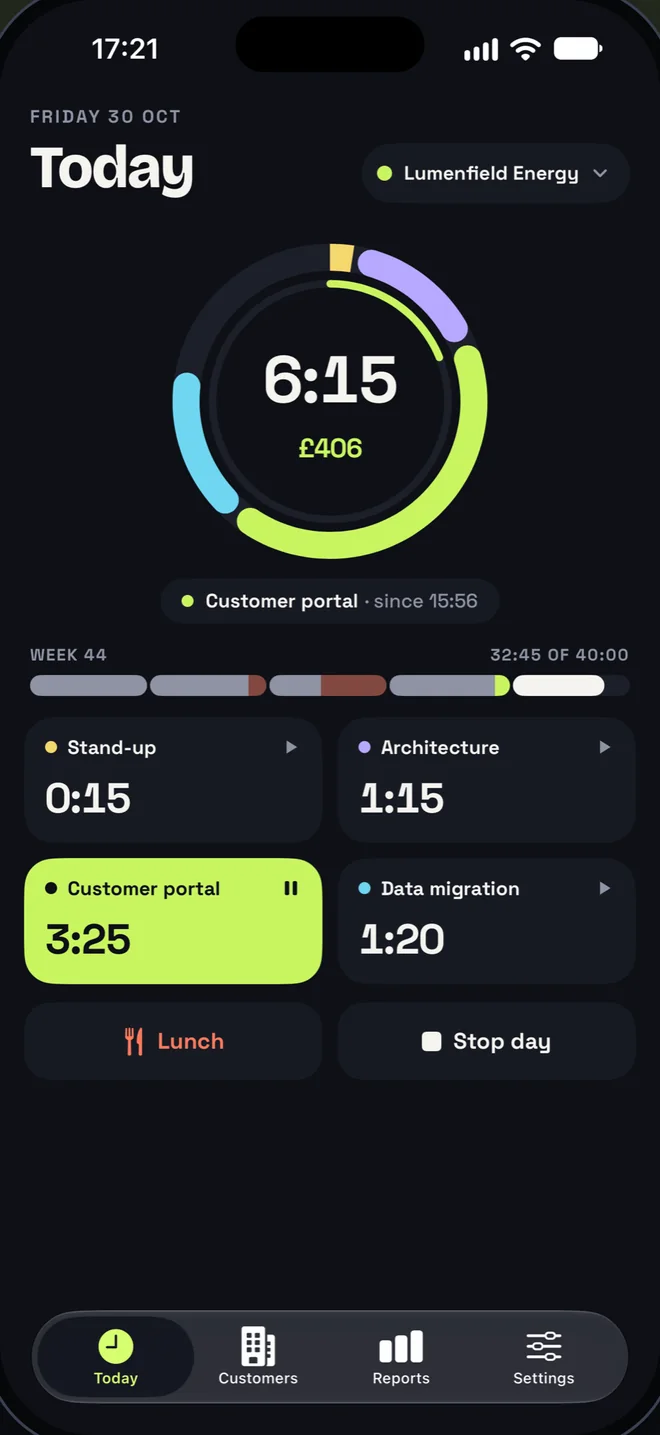
Timla’s Today screen: a ring of project colours around 6:15 worked and £406 earned, the week’s bar, four project cards with Customer portal running, and Lunch and Stop day buttons
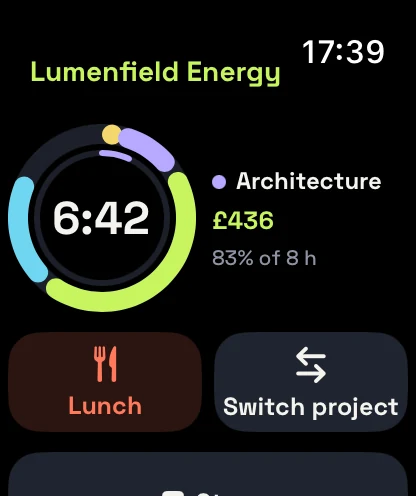
Timla on Apple Watch: the day ring at 6:42, Architecture running, Lunch and Switch project buttons
A day in Timla

One working day, one tap at a time.

Every tap closes one block of time and opens the next, so the day becomes a strip of coloured blocks that never overlap. Lunch sits in the middle of it and never counts as work.

8:24worked · lunch −0:42 not counted
  1. 07:59

    Start the day

    One tap starts the customer’s default project. Or let Timla start it when you arrive at the office.

  2. 11:52

    Lunch

    Lunch pauses the clock and is never counted as work. End it and you are back on the project you left.

  3. 12:34

    Back a little earlier?

    Press and drag the running card to move its start. The block before it moves along, so no gap opens up.

  4. 14:00

    A new assignment

    Add a project in seconds and switch to it with one tap. The running block closes and the new one starts that same second.

  5. 17:05

    Stop day

    Done for today. Start again later and the time adds to the same day.

  6. Friday

    Copy for timesheet

    The week, rounded the way your customer wants it, ready to paste into their time system.

Always within reach

Switch projects without unlocking.

The time that is running is never more than a glance away. Every surface shows the same day, and every button does the same thing as in the app.

Lock Screen

A Live Activity with the whole day on it.

Today’s time, the running project and the day against your goal. Tap a project chip to switch, or take lunch and stop, without opening the app.
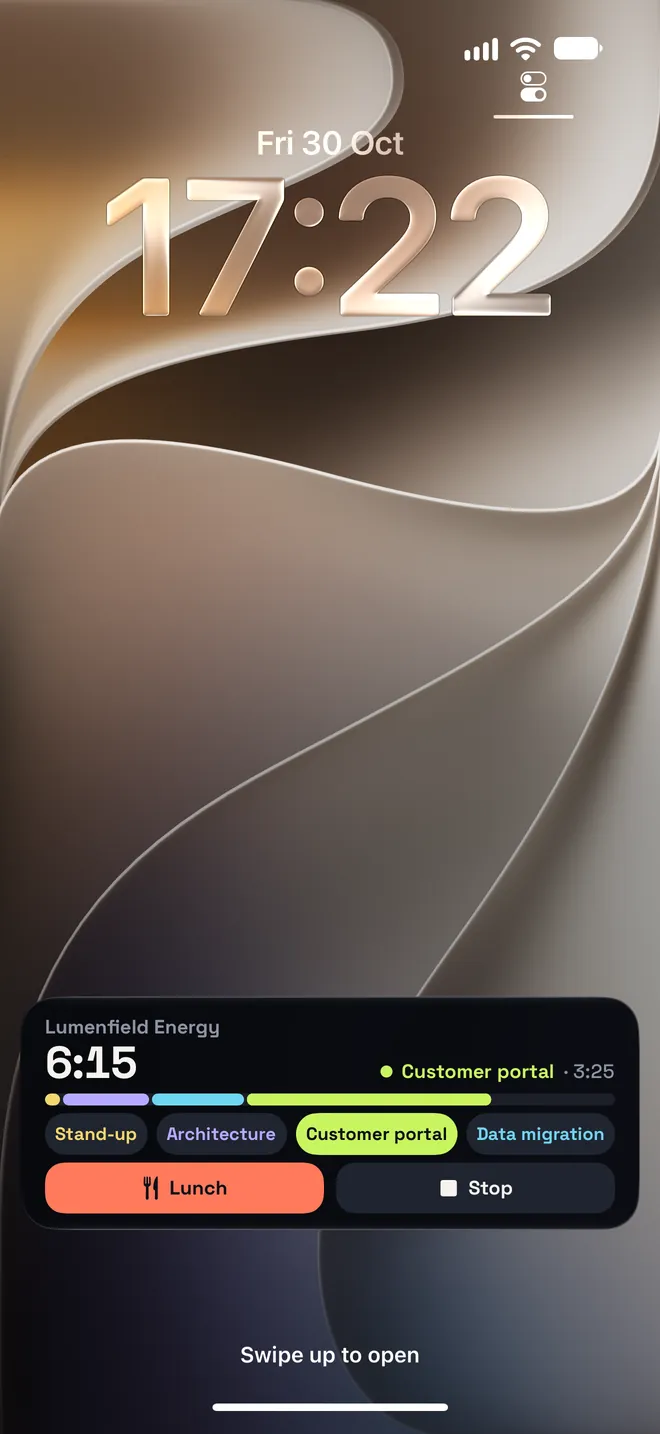
The Timla Live Activity on the Lock Screen: 6:15 for Lumenfield Energy, a coloured bar per project, project chips, and Lunch and Stop buttons
Apple Watch

The day on your wrist.

Start, switch project, take lunch and stop from the watch, even when your phone stays behind. Complications put today’s time and the ring against your goal on your watch face.
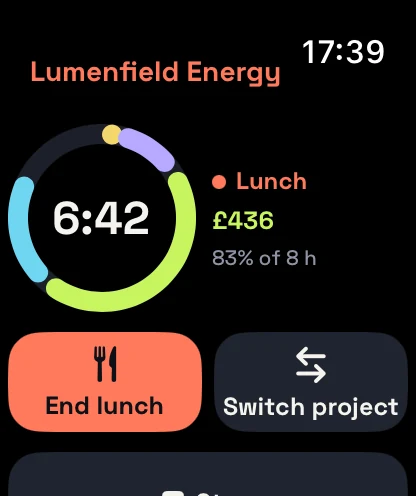
Timla on Apple Watch at lunch: the ring at 6:42 with Lunch in coral, End lunch and Switch project buttons
Dynamic Island

Running, at a glance.

The timer and the day’s ring stay up top while you work in other apps.

Control Center & widgets

One press from anywhere.

Two controls, one for the day and one for lunch, and a widget with today’s time for the Home Screen and the Lock Screen.

Siri & Shortcuts

Just say it.

Start, switch, lunch and stop are all Shortcuts, so Siri, the Action button and your automations can run them.
Start my day in Timla Lunch in Timla Stop my day in Timla

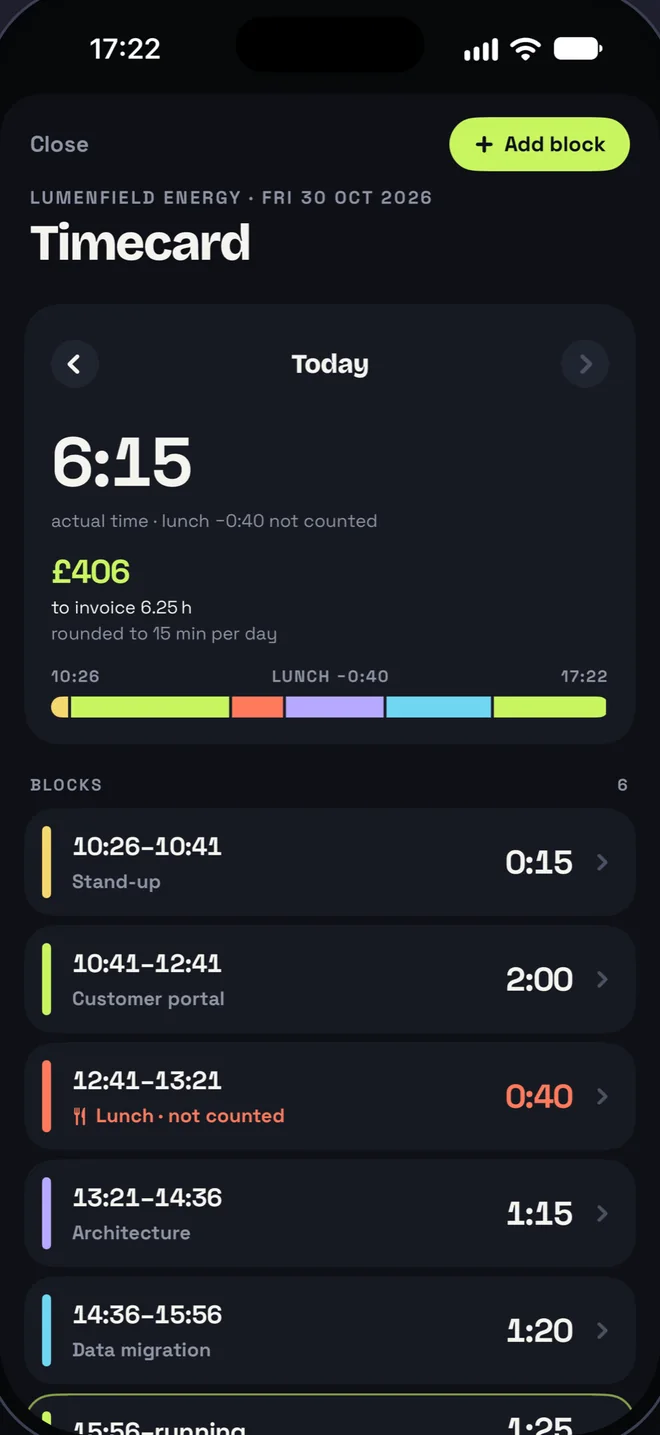
Timla’s Timecard: today at 6:15 with £406 to invoice, the day’s coloured bar with lunch in coral, and a list of blocks with their times
Forgot to tap?

The whole day, block by block.

The Timecard shows every block of the day. Fixing one takes a tap, not a spreadsheet.
  • Change any block afterwards. Its start, its end or its project, or add a block you missed.
  • Never an overlap. Move a block and the one touching it moves along, so no gap opens up either.
  • Forgot to stop? After a long day Timla asks when you actually stopped. It never stops a running day by itself unless you have told a place to.
  • Lunch is never counted. Delete one and the work around it closes the gap, in one block if it was the same project.
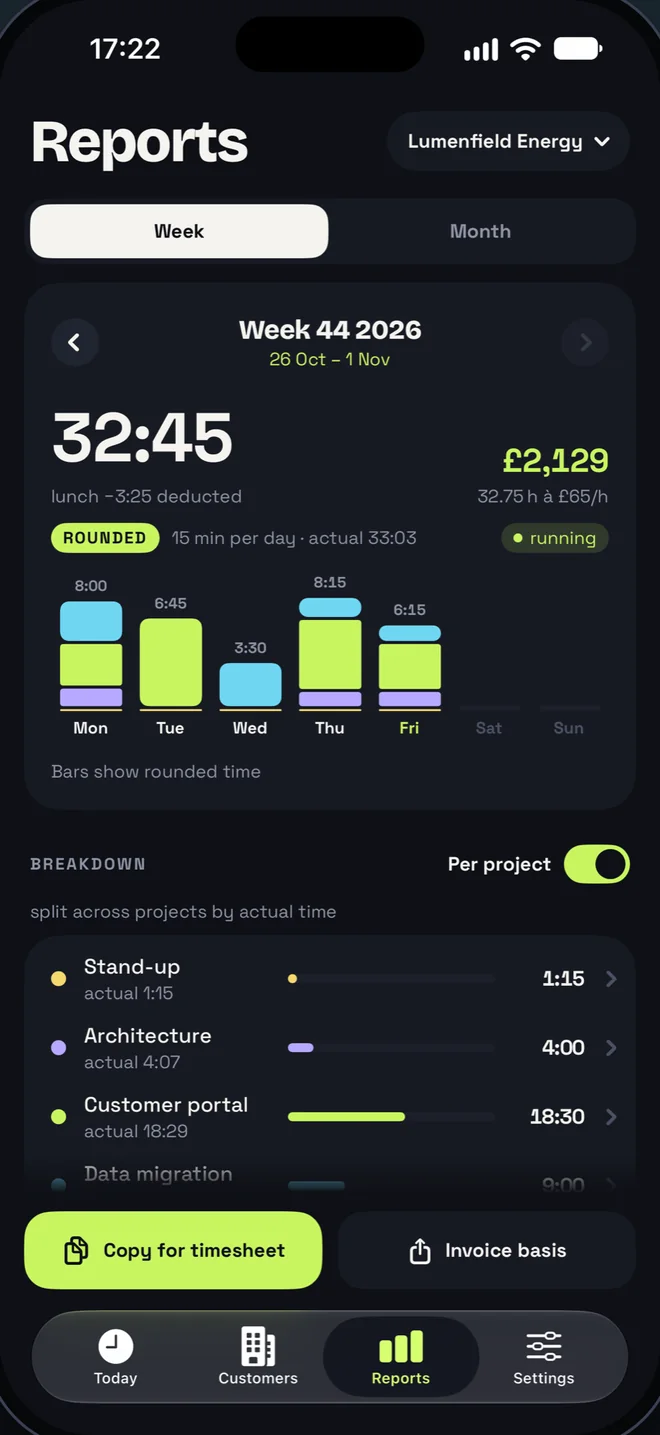
Timla’s Reports for week 44: 32:45 rounded, £2,129, a bar per day split by project, the per-project breakdown, and Copy for timesheet and Invoice basis buttons
Reports

The week, ready to invoice.

Week and month per customer, with or without projects, rounded the way your customer wants it.

  • Rounding per customer. None, 6, 15 or 30 minutes, to the nearest, up or down. The actual time is always shown next to it.
  • Copy for timesheet. Plain text that pastes straight into your customer’s time system.
  • Invoice basis. Hours, amounts and VAT per invoice period, as text and as a CSV file.
Copy for timesheetCopied
2026-10-26	Stand-up	0.25
2026-10-26	Architecture	1.50
2026-10-26	Customer portal	3.25
2026-10-26	Data migration	3.00
2026-10-27	Stand-up	0.25
2026-10-27	Customer portal	6.50
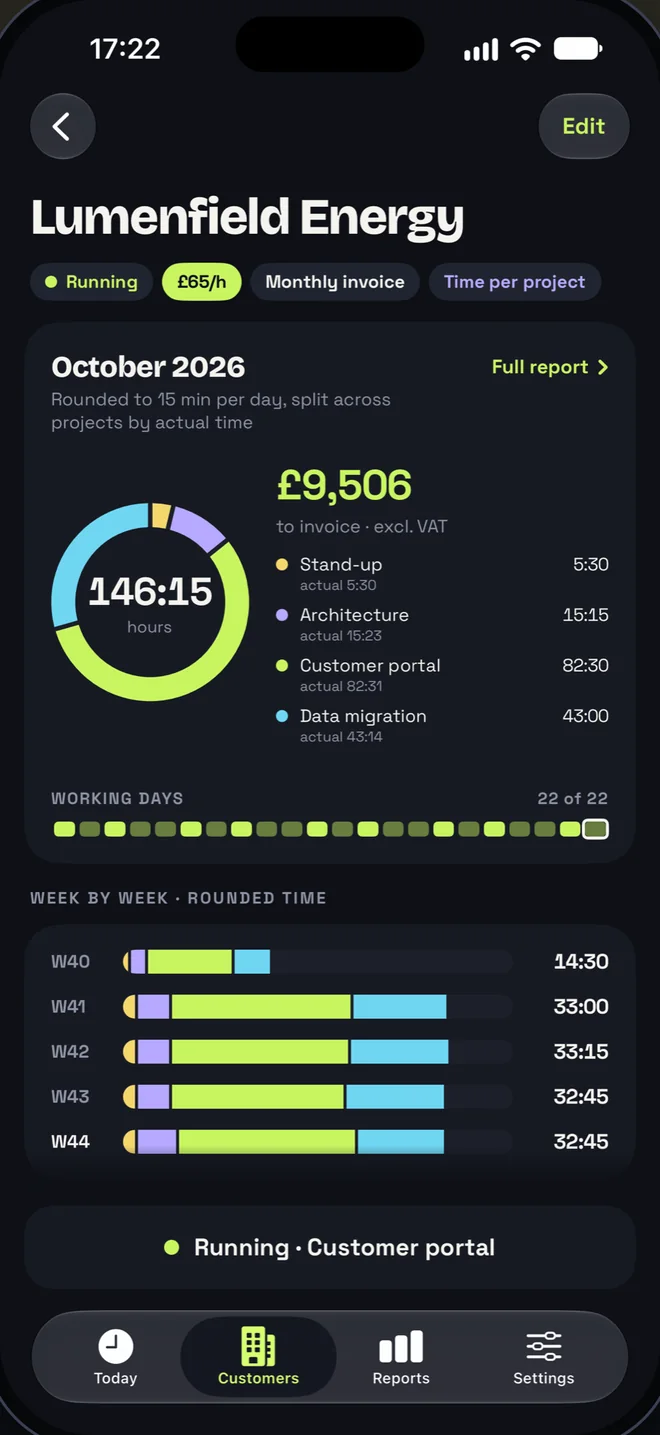
A customer in Timla: October 2026 with 146:15 hours and £9,506 to invoice, a donut by project, working days, and week-by-week bars
Customers & projects

Every customer, on their own terms.

Each customer gets an hourly rate, a currency, VAT and an invoice period, and the month at a glance.

  • Up to 40 active projects per customer, each with a colour and, if you need them, a project code and its own hourly rate.
  • Weekly or monthly invoicing, with VAT added in the invoice basis.
  • No hourly rate? Then Timla simply counts the hours.
  • A daily goal per customer. The ring on Today fills towards it, and a second lap shows the overtime.
SEKNOKDKKEURGBPUSDCHF
Places

Arrive, and the clock is already running.

Save the office as a place. Arrive within its start window and Timla starts the project; leave after its stop time and Timla stops the day.

  • Only the places you save. iOS tells Timla when you arrive or leave; it does not follow you around.
  • Working for another customer? Then Timla asks before it switches.
  • Every automatic start and stop can be undone from the notification, for 30 minutes.
  • Timla itself never sends your location anywhere. Setting up a place uses Apple Maps, so the map area on screen and anything you search for go to Apple.
Office
Timla started Stand-up · Lumenfield Energy at OfficeAt Office from 07:59.
Undo
Your data is yours

Your hours belong to you.

Timla has no account and no server, and nothing in it tracks you. Everything is stored on your iPhone, and your Apple Watch syncs with it. Export everything as one file whenever you like, and import it again on a new phone.

Read the privacy policy →

0Accounts
0Servers
0Trackers
Six languages

Speaks your language.

Timla follows your iPhone’s language, down to the exported reports. Any other language gets English.

SvenskaSVEnglishENNorskNBDanskDADeutschDENederlandsNL
Questions

The short answers.

Who is Timla for?
Consultants, freelancers and anyone else who bills by the hour or just wants to know where the time goes. It is built around customers and their projects: an hourly rate, a currency and VAT per customer, and reports that end up in the customer’s own time system or on an invoice.
Do I need an account?
No. There is no sign-up, no login and no server. Everything you track is stored on your iPhone, and your Apple Watch syncs with it over Apple’s own connection between the two.
Does it sync to my iPad or Mac?
Not today. Your iPhone holds the one copy of your time, and the Apple Watch app mirrors it. To move to a new phone, export everything as one file in Settings and import it on the new one.
How does rounding work?
Per customer: none, 6, 15 or 30 minutes, to the nearest, up or down. Timla rounds each day once and then splits the rounded day across projects by their actual time, so four short meetings never turn into an extra hour of billing. Your actual time is always shown next to the rounded time, and the rounding only ever happens in reports.
What does “Copy for timesheet” give me?
Plain text you can paste straight into a customer’s time system: one line per day, or per day and project when the customer wants time per project, with the project code instead of the name if you have set one. The invoice basis comes as text and as a CSV file, with hours, amounts and VAT per invoice period.
Does Places track where I go?
No. Places uses iOS region monitoring for the places you save, so iOS only tells Timla when you arrive at or leave one of them, and Timla acts only within the times you set. It keeps no location history, and Timla itself never sends your location anywhere. Setting up a place uses Apple Maps, so the map area and your search go to Apple.
What do I need?
An iPhone with iOS 18 or later. The Apple Watch app needs watchOS 11 or later and a paired iPhone with Timla.

Timla

Always know what your day is worth.

Coming soon to the App Store
iPhone with iOS 18 or later · Apple Watch with watchOS 11 or later